Blank-looking symbols
Some profiles, labels and text fields display a Braille blank cell without a visible mark. The stored value is still a symbol and may count toward a limit.
U+2800 · Braille Pattern Blank · blank cell
Copy the actual U+2800 character, see why it can look like an empty cell without being a space, and choose it only when its symbol-like behavior fits your destination.
The blue boundary explains the character’s position. It is not part of what the copy button writes.
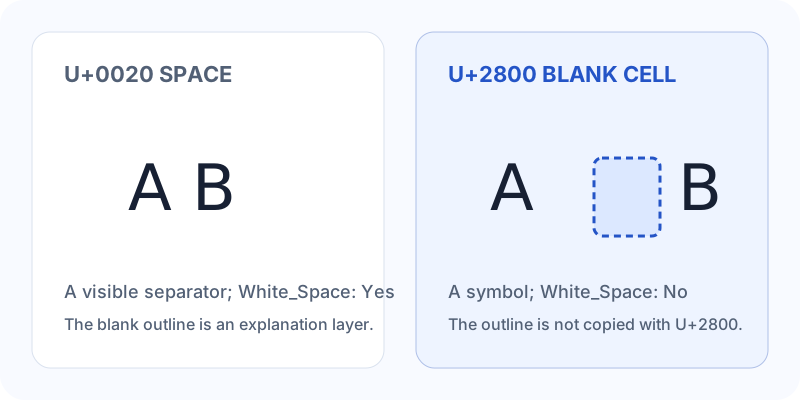
A⠀B contains three code points even if the middle symbol looks empty. That makes it different from an empty string and different from U+0020, the ordinary space. It may occupy a cell-like width in a font, but width is a rendering result rather than a promise made by this page.
Unicode’s name list specifically describes U+2800 as a fixed-width blank image in many fonts while noting that it does not act as a space. If you need word spacing or a non-breaking separator, use the appropriate space character instead.
Use the copy control when a destination needs U+2800 itself. Typing a visible code-point label inserts letters and digits instead.
"\u2800"⠀⠀U+2800The six visible characters U+2800 are a description. The manual field and buttons contain the actual blank Braille character.
| Character | Category | Typical behavior | Choose it when |
|---|---|---|---|
| Braille Pattern BlankU+2800 | So · Other Symbol | Blank-looking cell; width depends on the font | You want this symbol’s blank-cell appearance |
| Hangul FillerU+3164 | Lo · Other Letter | Blank-looking letter in many fonts | You are testing a letter-like blank character |
| Zero Width SpaceU+200B | Cf · Format | No visible width; possible line break | You need a hidden break opportunity |
| No-Break SpaceU+00A0 | Zs · Space Separator | Space-like width; normally resists a break | You need words or values to stay together |
Some profiles, labels and text fields display a Braille blank cell without a visible mark. The stored value is still a symbol and may count toward a limit.
A font may show a cell-like width, a marker or a replacement box. If the saved code point is still U+2800, the display result belongs to the destination environment.
Trimming, collapsing and whitespace filters do not have to treat U+2800 like U+0020 or U+00A0. This is useful only when that difference is intentional.
Reopen the destination and paste the saved value into the invisible character checker before relying on the result.
The name, block and category use Unicode’s official character data. The page illustration explains the difference between a symbol and a space; it does not certify how another font or app renders U+2800.
Use Copy 1 for one blank cell or a short amount for a repeated sequence. If automatic copy is blocked, select the manual field.
Keep the destination in view. The brackets and teaching outline from this page are not part of the output.
Apps can remove, normalize, reject or display the symbol differently. The checker tells you which code point remains.
No. U+0020 and U+00A0 are Unicode space characters. U+2800 is an Other Symbol in the Braille Patterns block and is not marked as Unicode White_Space.
Many fonts image it as a blank Braille cell. That is a glyph and layout result; the stored value is still a real symbol.
Do not assume a fixed width across fonts, browsers or apps. The Unicode name list describes a fixed-width blank image in many fonts, while the actual display remains environment-dependent.
No page can guarantee that. A destination may keep, trim, normalize or reject the character. Save and inspect the result where it matters.
Yes. It is one Unicode code point even when its glyph looks blank. Repeating it increases the code-point count and may change the displayed width.
Paste the text into the invisible character remover, select the U+2800 row and compare the cleaned copy before copying it.
They are different classes: U+2800 is a Braille symbol and U+3164 is a Hangul letter. Compare the destination’s result instead of treating their blank appearance as proof that they are interchangeable.
Use ⠀ or ⠀ in HTML source, or the actual character in text content. A visible “U+2800” label is only notation.
Use the comparison guide when you are deciding among blank-looking choices, the checker when you already have text, or the remover when U+2800 is unwanted.