Numbers and units
Keep a value such as `25 kg` or grouped digits together when a line break between the number and unit would confuse the reader.
U+00A0 · No-Break Space · NBSP
Copy the real U+00A0 separator, see how it keeps adjacent text together when line breaking is supported, and learn when a normal space or a different invisible character is the better choice.
The boundary marks make the separator easier to locate. They are not part of the copied output.
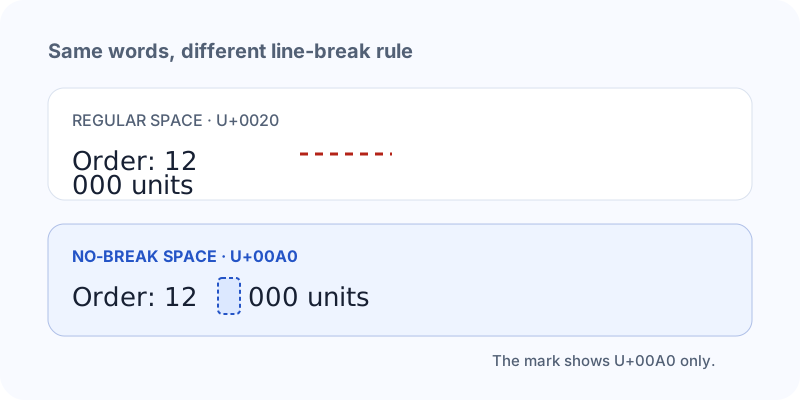
12 000 contains a real separator between the number groups, but the line-breaking rule treats the two sides as a unit in contexts that honor Unicode line breaking. It normally has the same width as U+0020 in a font.
This is useful for a number and unit, a short name, a date or any phrase where a break would make the reading worse. It does not make an element’s CSS layout unbreakable in every situation, and an application can still normalize or replace it.
In source code, ` ` is an entity reference. In the text value after parsing, the character is U+00A0.
"\u00A0"   In ordinary text, use the actual character from the copy control. In HTML source, the named or numeric entity is interpreted by the browser.
| Character | Category | Typical behavior | Choose it when |
|---|---|---|---|
| No-Break SpaceU+00A0 | Zs · Space Separator | Space-like width; normally resists a break | A short value should stay together |
| Regular SpaceU+0020 | Zs · Space Separator | Visible gap; ordinary break opportunity | You need normal word spacing |
| Zero Width SpaceU+200B | Cf · Format | No visible width; possible break | You need an invisible break hint |
| Braille Pattern BlankU+2800 | So · Other Symbol | Blank-looking cell; not whitespace | You want a blank-looking symbol |
Keep a value such as `25 kg` or grouped digits together when a line break between the number and unit would confuse the reader.
A two-part name or label can stay together when it is treated as one visible phrase. Choose this deliberately rather than replacing every space in a paragraph.
Non-breaking spaces often arrive from formatted pages, PDFs and rich text. If they are causing matching or cleanup problems, inspect first and use the whitespace normalizer selectively.
U+00A0 normally creates a visible gap and may be trimmed at the edge of a field. It is not a reliable replacement for a blank-looking character.
The Unicode name, category and space-character membership use official Unicode material. The visible example explains a common browser result; HTML, CSS and destination apps can apply their own normalization and layout rules.
Use Copy 1 or the manual field. Do not paste the visible label `U+00A0` unless you are documenting the code point.
Keep the ordinary spaces around it unchanged. A whole paragraph made from NBSP can become difficult to wrap and edit.
Use the checker when matching, importing or form validation depends on the exact code point.
No. It usually renders as a space-like gap, often with the same width as U+0020. The difference is mainly how line breaking and text processing treat it.
` ` is an HTML named entity that represents U+00A0 in source. After the HTML is parsed, the text value contains the character itself.
Rich text, web pages and PDF extraction can use non-breaking separators to preserve layout. The checker can show where they occur, and the normalizer can convert selected ones.
It expresses a no-break relationship in Unicode line breaking, but layout engines, surrounding characters and applications can still affect the final display. Treat it as a strong text-level instruction, not a universal CSS lock.
It normally occupies visible space and may be trimmed or rejected. If the task is a blank-looking field, compare U+2800 or U+3164 while remembering that the destination may reject either.
Use the whitespace normalizer when you want a controlled conversion to U+0020, or use the invisible character remover only for the hidden-character classes it supports.
Yes. It is one Unicode code point and many counters include it. Its glyph may look like an ordinary space, but exact matching can distinguish it from U+0020.
Paste the value into the checker. It reports the code point and position without replacing the original text.
Use the normalizer for copied spacing cleanup, the checker for exact inspection, or the comparison guide when you are choosing between a space, a symbol and a zero-width control.